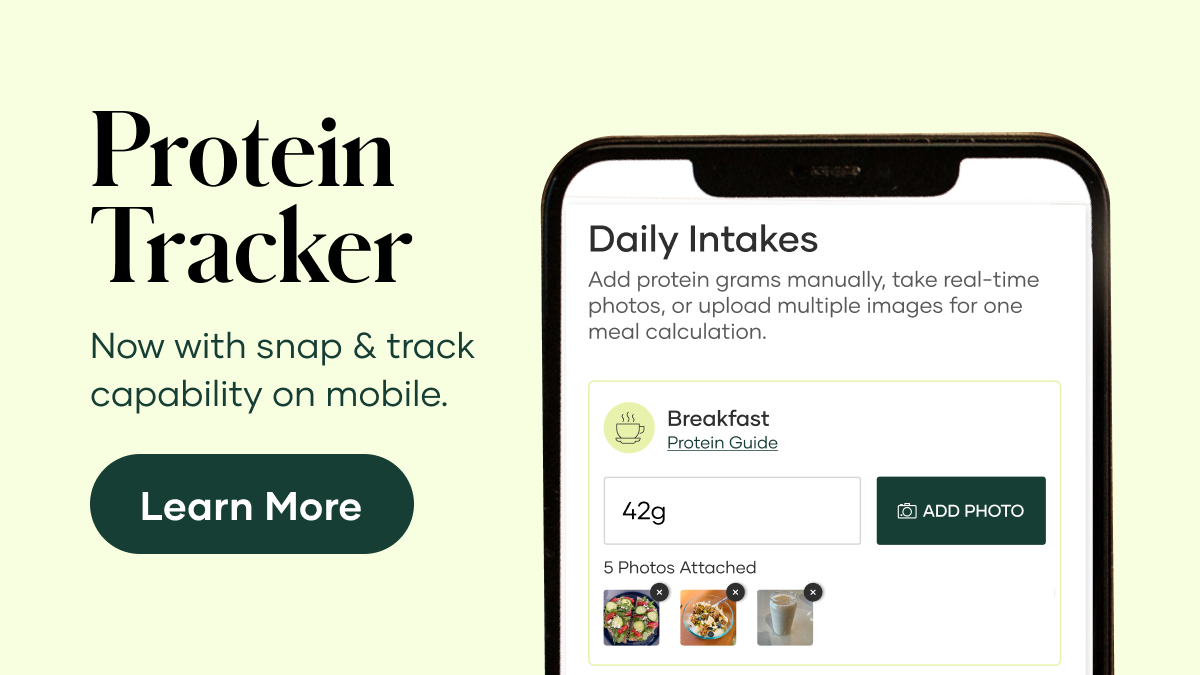
Meet the Updated Weekly Protein Tracker
The Weekly Protein Tracker is a simple, shareable digital tool that helps people see where they are toward their daily protein goal – meal by meal, day by day – while creating a natural way to start conversations about how Shaklee products can help fill the gaps. And with several powerful new updates, the tracker is now even easier to use, more flexible, and more intuitive across devices.
With the Weekly Protein Tracker, users can:
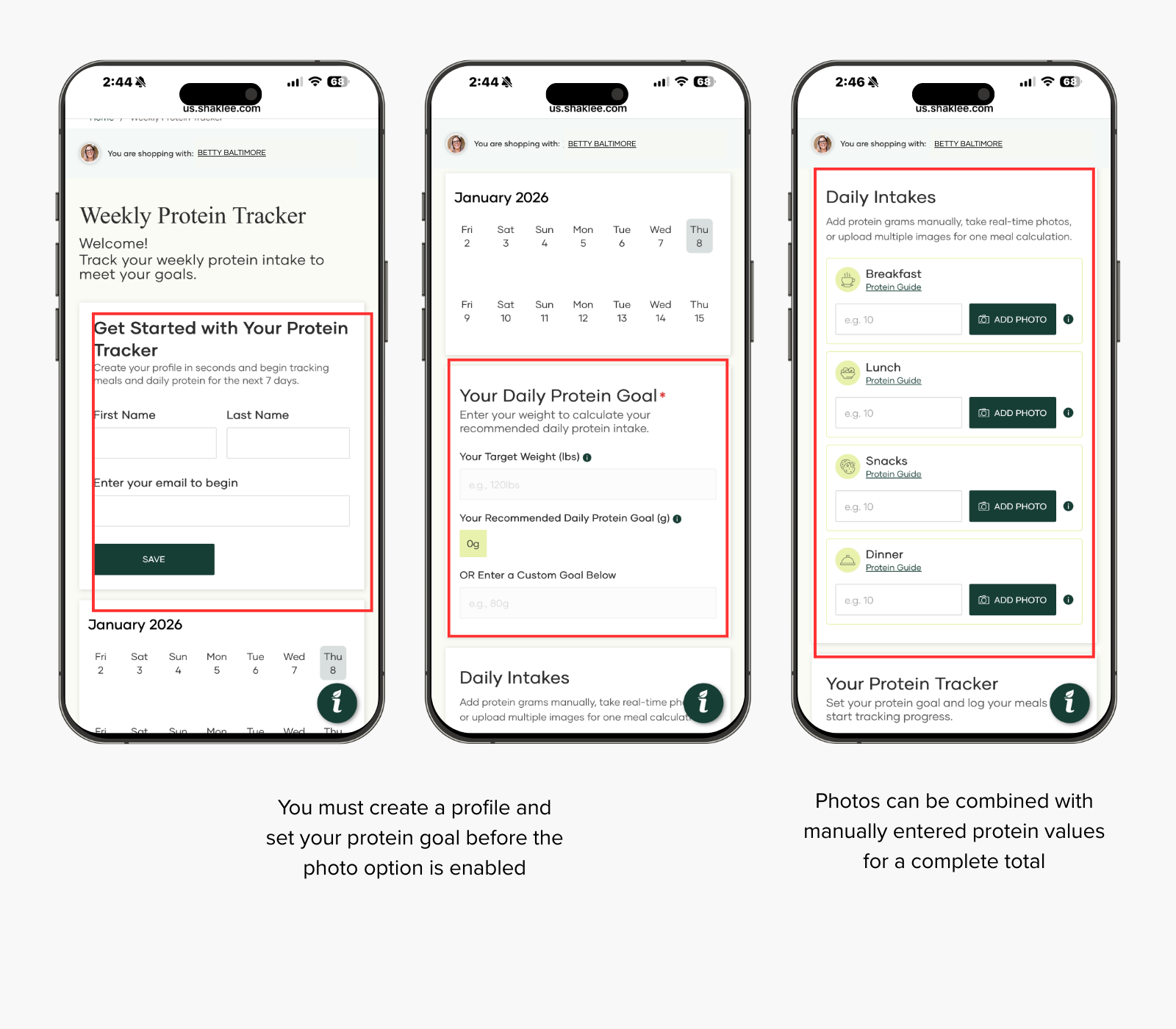
- Set a daily protein goal based on target weight or enter a custom goal
- Log protein intake by meal – breakfast, lunch, snack, and dinner – with decimal precision
- See progress update automatically throughout the day with a clear visual tracker
- Stay motivated with encouraging messages, practical tips, and relevant product suggestions
Designed to be intuitive and low-friction, the tracker supports both first-time users and those building consistent habits over time. It’s available across the U.S., Canada, and Australia, with built-in Spanish and French translations and region-specific product recommendations.
One of the most exciting new features is Snap and Track, which allows users to estimate protein* intake by simply taking a photo of their food—right from their mobile device.
Here’s how it works:
- Take a photo of your meal using your phone, and the tracker uses AI photo analysis* to estimate the protein grams
- Upload multiple photos for the same meal, and the tracker automatically adds them together
- Photos can be combined with manually entered protein values for a complete total
For example, you might snap a photo of your plate, then manually add the known protein amount from a Sparkling Protein Beverage or yogurt. The tracker reflects the combined total.
Pro Tips:
- Snap and Track is available only on mobile devices
- You must create a profile and set your protein goal before the photo option is enabled
- The feature does not read nutrition labels – it estimates protein based on food images
- You can mix photo-generated values and manual entries for the same meal
If you later log in on desktop, you’ll see the protein totals you entered (including those generated from photos), but the photos themselves will not display.
*This SnapCalorie AI-powered protein tracker is designed to provide an estimate of protein content based on your uploaded photos of food items. It uses image recognition and nutritional data analysis to generate approximations, but results are not guaranteed to be 100% accurate. Factors such as image quality, lighting, portion size variations, food preparation methods, and database limitations may lead to inaccuracies or incomplete assessments. We make no warranties regarding the accuracy, completeness, or reliability of the information provided.
Please note that this tool is for informational and educational purposes only and should not be used as a substitute for professional nutritional advice, medical diagnosis, or treatment. Always consult a qualified healthcare professional, registered dietitian, or use certified nutritional tools for precise dietary needs, especially if you have health conditions, allergies, or specific nutritional requirements.
A More Flexible Tracking Week
The tracker is no longer locked into a Monday – Sunday cycle.
Now:
- You can start tracking on any day of the week
- Each tracking period follows a rolling 7-day window
- You can view and edit entries from the previous days in your current window
- Future dates are visible but cannot be logged until that day arrives
The current day is clearly highlighted so users always know where they are, even as the week rolls forward.
Seamless Access Across Devices
Another major improvement: cross-device access.
When you’re logged in, your tracker data is now accessible across devices. That means you can start tracking on your phone and later check your progress on desktop – without losing your protein totals.
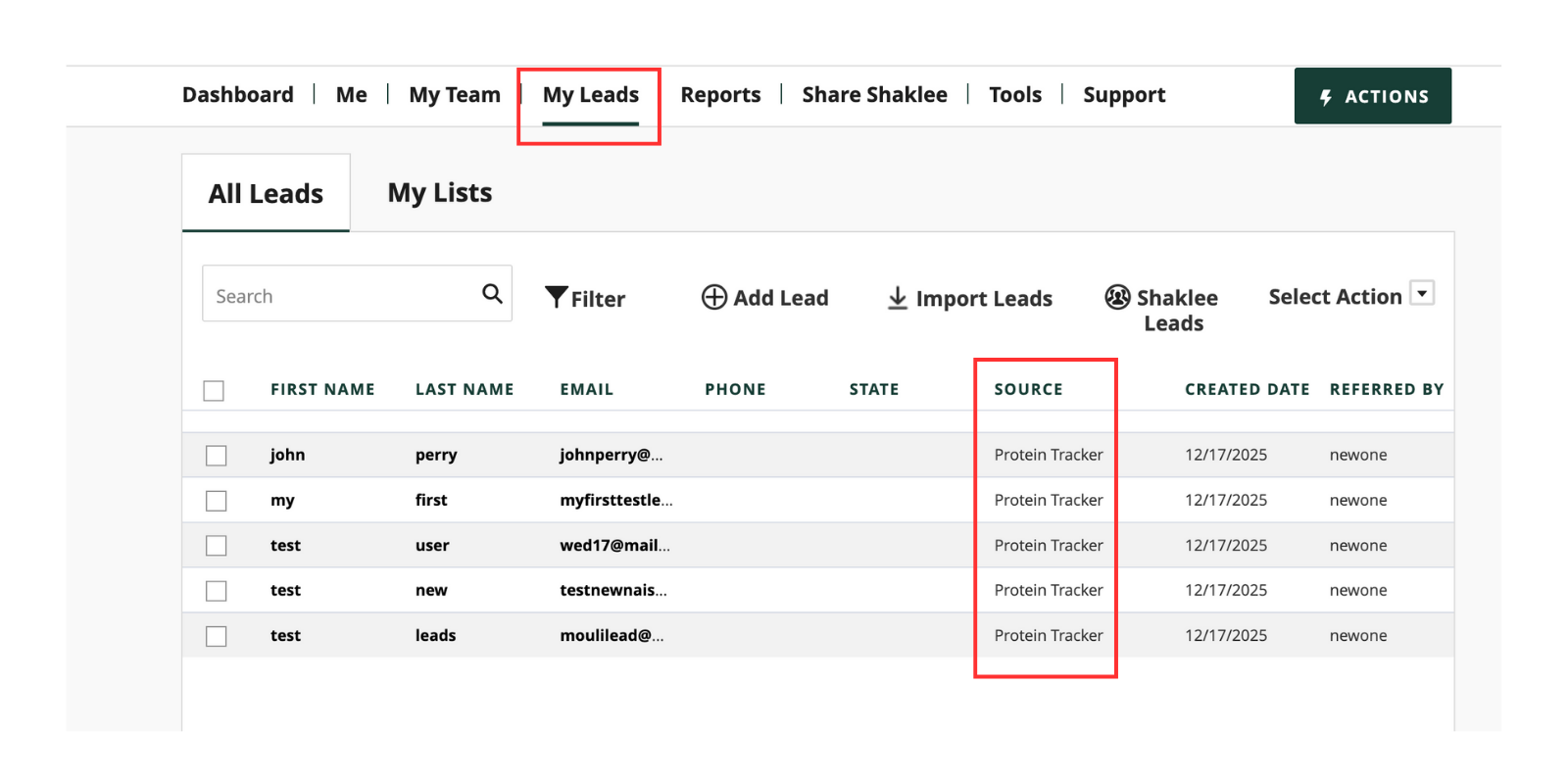
For Ambassadors sharing the Tracker as a business-building tool, there’s now a New Prospects Report available in the Back Office under Leads.
This report captures:
- New prospects who use your shareable Protein Tracker link
- Name and email information for those leads
A few important clarifications:
- The report is not retroactive – it only captures leads from the point of launch forward
- It includes prospective customers or Ambassadors only
- Existing customers who use the Tracker for the first time will not appear in this report
This update adds visibility where there previously was none and creates a clearer connection between sharing the tracker and generating new leads.
Protein Tracker FAQ
- What is the Weekly Protein Tracker? The Weekly Protein Tracker is a digital tool that helps you track your daily protein intake, visualize your progress toward your weekly protein goal, and stay motivated with helpful tips and product recommendations.
- Do I need to log in to use the Tracker? No login is required. However, you must enter a valid email address to save and access your data. Your email helps us store your tracking progress across sessions on the same device.
- Can I use the tracker on multiple devices? When logged in, your protein totals carry across devices. Photo uploads are visible only on mobile, but the protein values remain available everywhere.
- How do I set my protein goal? You can set your goal by entering your body weight, or you can choose to enter a custom goal. The Tracker uses a standard formula (0.8 g protein per pound of body weight) for recommended goals, rounded to the nearest whole number.
- Can I enter decimal values for protein intake? Yes, you can enter daily protein intake with up to one decimal place(e.g., 25.5 g). The Tracker does not allow letters or more than one decimal point.
- What does the mini calendar show? The calendar view shows your weekly progress, Monday through Sunday. The current day is highlighted. Bubbles appear only on days where protein intake has been logged. Missed days will appear blank.
- Can I go back and log protein for previous days? You can click on a previous day to enter your intake. However, you cannot enter data for future dates.
- Can I combine photos and manual entries? You can add manual protein amounts alongside photo-estimated values for the same meal.
- Does Snap and Track read nutrition labels? It estimates protein from food images only.
- What are the “Tips to Crush Your Protein Goal”? This section provides simple, practical advice to help you reach your protein targets each day. It also includes links to Shaklee products that support protein intake and hydration.
- Why is there a hydration section in my protein tracker? Hydration is important for overall wellness and protein metabolism. Especially when someone is increasing their intake. This section highlights Shaklee’s hydration products. Availability and products may vary by country.
- I’m in Canada or Australia. Why are some products not showing up? Product availability varies by country. Certain products shown in the tracker may not be available outside the U.S. You’ll only see relevant product links for your region.
- Is the tracker available in other languages? Yes! The tracker is fully translated into Spanish and French, including guides and tips. The appropriate version will appear based on your location or browser language settings.
- What is the “streak” message in the calendar? The streak message is there to motivate you! It celebrates consistency. You’ll see this message change as you track more days in a row.
- Will I receive any rewards or badges for using the tracker? While no physical rewards are given, you may receive motivational messages or virtual “badges” for consistently tracking your intake or hitting your goals.
- I entered the wrong email. Can I change it? To maintain your progress, always use the same email address. If you accidentally used a different one, you’ll have to re-enter your data or continue tracking from that point forward.